> ## Documentation Index
> Fetch the complete documentation index at: https://wiki.hoa.moe/llms.txt
> Use this file to discover all available pages before exploring further.
# 课程页面构建
> 了解 HOA 后端以及 CI 架构
 ## CI
后文均假定读者对 CI 概念、GitHub Actions 有基础了解
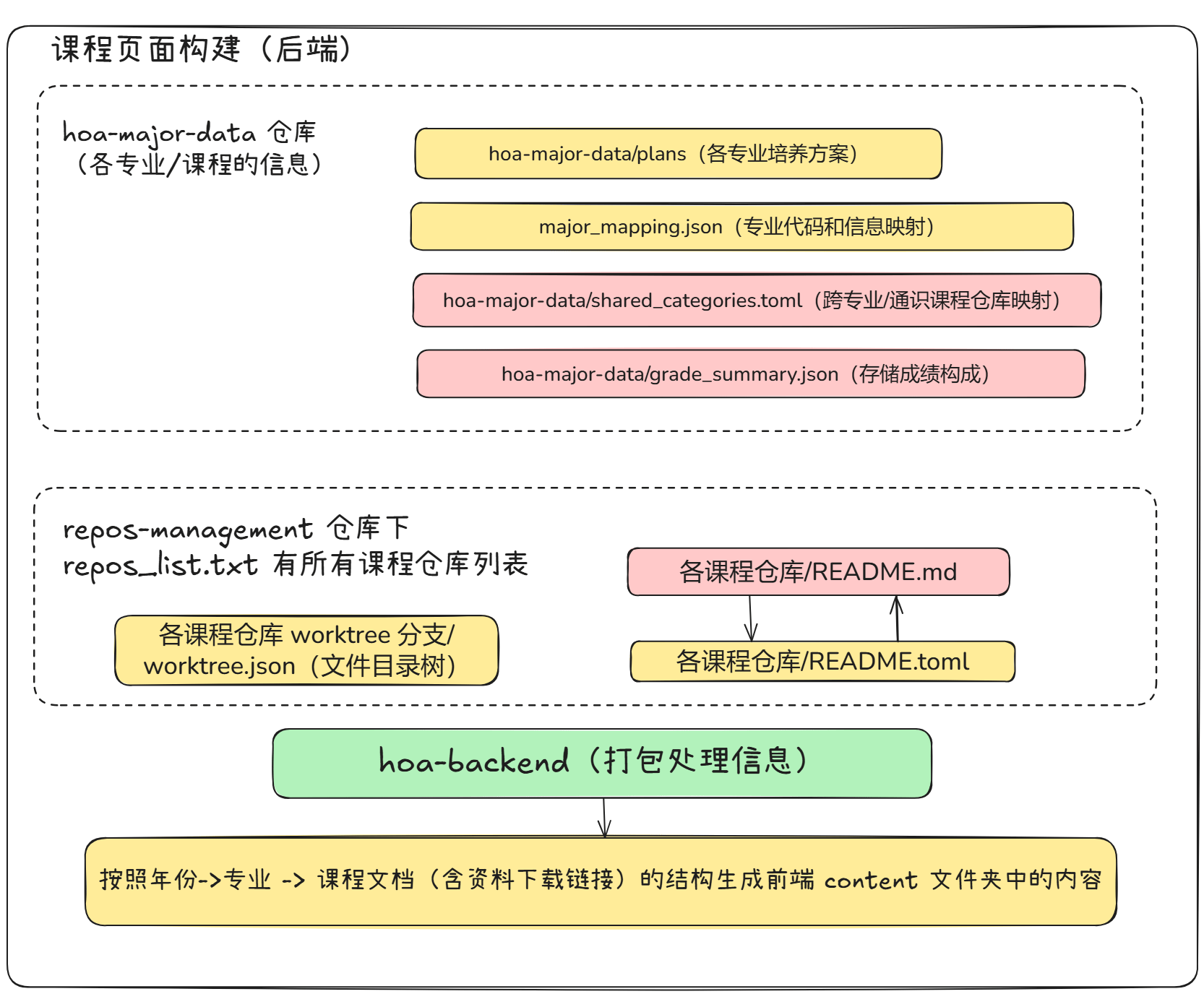
对一个课程仓库而言,起着直接作用的是三个文件:(读者可点开任意一个仓库对照,比如我们第一个独立成仓库的 [大学物理实验](https://github.com/HITSZ-OpenAuto/PHYS1002/))
* `README.md`
* `README.toml`
* `worktree` 分支下的 `worktree.json`
前两个用于构建用户所看到的课程攻略主体。
后者预构建了仓库内资料的元信息,方便前端直接渲染文件树,不必再自行获取仓库内文件信息。
这三个文件都是通过 CI 自动化生成的。
### 仓库内 CI
所有课程仓库都是一样的,以 [https://github.com/HITSZ-OpenAuto/PHYS1002/blob/main/.github/workflows/trigger-workflow.yml](https://github.com/HITSZ-OpenAuto/PHYS1002/blob/main/.github/workflows/trigger-workflow.yml) 为例:
```yaml theme={null}
name: Call Worktree Update
on:
push:
branches: [ "main" ]
workflow_dispatch:
jobs:
call_reusable_workflow:
uses: HITSZ-OpenAuto/repos-management/.github/workflows/reusable_worktree_generate.yml@main
with:
# trigger_page_build == true only when pushing to main branch
trigger_page_build: ${{ github.event_name == 'push' && github.ref == 'refs/heads/main' }}
```
(已删去部分字段,只关注本文相关的)
其实仓库内 CI 并没有实质的逻辑,它不过是在 `call_reusable_workflow` **复用**(uses)了一个工作流。这个过程类似于函数,将**重复的逻辑**抽离出来方便调用。函数内逻辑在下一小节讲解。
在 HOA 早期,仓库内 CI 是有实质内容的——这就带来一个问题,当 HOA 的构建步骤有变化,所有仓库都需要更新这些 CI 文件。
如今的 `repos-management` 仓库里还有用于批量更新 CI 脚本的 [shell 脚本](https://github.com/HITSZ-OpenAuto/repos-management/blob/main/scripts/add_workflow.sh)。时代的眼泪~
#### on 字段-触发时机
1. 当 main 分支推送更新时,会触发一次 CI——对大多数贡献者来说,就是 **PR 被我们审核、通过并合并**了;这时会进行更新,把各位的创意展现出来。
2. workflow\_dispatch,用于手动触发更新,一般调试用。
### 可复用 CI 逻辑
仓库内 CI 调用的是 `uses: HITSZ-OpenAuto/repos-management/.github/workflows/reusable_worktree_generate.yml@main`, GitHub Actions 执行时会自动找到这个文件,在 [这里](https://github.com/HITSZ-OpenAuto/repos-management/blob/main/.github/workflows/reusable_worktree_generate.yml)——该脚本看上去就很长、有内容。
我们只关注 CI 的部分,至于具体的功能实现会给出对应脚本地址,但不作讲解,有兴趣的读者可自行探索。
#### README.md ⭤ README.toml 双向同步
为方便通过其他方式同步,每个仓库用 `README.toml` 作为 `README.md` 的结构化存储,这就要求两者能够信息同步。修改时,既可以写人类友好的 markdown,也可以通过一些(可能的)结构化修改方式,借由程序修改 `README.toml`。
这一 step 名称为 `RDME bidirectional autogen (format + sync + warning)`,所用到的脚本为 [https://github.com/HITSZ-OpenAuto/repos-management/blob/main/scripts](https://github.com/HITSZ-OpenAuto/repos-management/blob/main/scripts) 下的 `rdme_autogen.py` 和 `readme_to_toml.py`。
#### 仓库 worktree 构建
这一步构建 `worktree.json`,包含仓库内所有文件的完整路径、大小、修改时间,方便前端直接构建「资源下载」部分的文件夹逻辑。注意这个文件在 `worktree` 分支。
所用的脚本为 [https://github.com/HITSZ-OpenAuto/repos-management/blob/main/scripts/generate\_worktree\_info.py。](https://github.com/HITSZ-OpenAuto/repos-management/blob/main/scripts/generate_worktree_info.py。)
#### 更新仓库列表
如上图所表示,`repos_list.txt` 包含所有课程仓库的代号。这个列表目前也会在每一次触发时更新。在 `Trigger Update Repositories List workflow` 这一 step 中完成。
This documentation is built and hosted on [Mintlify](https://mintlify.com), a developer documentation platform.
## CI
后文均假定读者对 CI 概念、GitHub Actions 有基础了解
对一个课程仓库而言,起着直接作用的是三个文件:(读者可点开任意一个仓库对照,比如我们第一个独立成仓库的 [大学物理实验](https://github.com/HITSZ-OpenAuto/PHYS1002/))
* `README.md`
* `README.toml`
* `worktree` 分支下的 `worktree.json`
前两个用于构建用户所看到的课程攻略主体。
后者预构建了仓库内资料的元信息,方便前端直接渲染文件树,不必再自行获取仓库内文件信息。
这三个文件都是通过 CI 自动化生成的。
### 仓库内 CI
所有课程仓库都是一样的,以 [https://github.com/HITSZ-OpenAuto/PHYS1002/blob/main/.github/workflows/trigger-workflow.yml](https://github.com/HITSZ-OpenAuto/PHYS1002/blob/main/.github/workflows/trigger-workflow.yml) 为例:
```yaml theme={null}
name: Call Worktree Update
on:
push:
branches: [ "main" ]
workflow_dispatch:
jobs:
call_reusable_workflow:
uses: HITSZ-OpenAuto/repos-management/.github/workflows/reusable_worktree_generate.yml@main
with:
# trigger_page_build == true only when pushing to main branch
trigger_page_build: ${{ github.event_name == 'push' && github.ref == 'refs/heads/main' }}
```
(已删去部分字段,只关注本文相关的)
其实仓库内 CI 并没有实质的逻辑,它不过是在 `call_reusable_workflow` **复用**(uses)了一个工作流。这个过程类似于函数,将**重复的逻辑**抽离出来方便调用。函数内逻辑在下一小节讲解。
在 HOA 早期,仓库内 CI 是有实质内容的——这就带来一个问题,当 HOA 的构建步骤有变化,所有仓库都需要更新这些 CI 文件。
如今的 `repos-management` 仓库里还有用于批量更新 CI 脚本的 [shell 脚本](https://github.com/HITSZ-OpenAuto/repos-management/blob/main/scripts/add_workflow.sh)。时代的眼泪~
#### on 字段-触发时机
1. 当 main 分支推送更新时,会触发一次 CI——对大多数贡献者来说,就是 **PR 被我们审核、通过并合并**了;这时会进行更新,把各位的创意展现出来。
2. workflow\_dispatch,用于手动触发更新,一般调试用。
### 可复用 CI 逻辑
仓库内 CI 调用的是 `uses: HITSZ-OpenAuto/repos-management/.github/workflows/reusable_worktree_generate.yml@main`, GitHub Actions 执行时会自动找到这个文件,在 [这里](https://github.com/HITSZ-OpenAuto/repos-management/blob/main/.github/workflows/reusable_worktree_generate.yml)——该脚本看上去就很长、有内容。
我们只关注 CI 的部分,至于具体的功能实现会给出对应脚本地址,但不作讲解,有兴趣的读者可自行探索。
#### README.md ⭤ README.toml 双向同步
为方便通过其他方式同步,每个仓库用 `README.toml` 作为 `README.md` 的结构化存储,这就要求两者能够信息同步。修改时,既可以写人类友好的 markdown,也可以通过一些(可能的)结构化修改方式,借由程序修改 `README.toml`。
这一 step 名称为 `RDME bidirectional autogen (format + sync + warning)`,所用到的脚本为 [https://github.com/HITSZ-OpenAuto/repos-management/blob/main/scripts](https://github.com/HITSZ-OpenAuto/repos-management/blob/main/scripts) 下的 `rdme_autogen.py` 和 `readme_to_toml.py`。
#### 仓库 worktree 构建
这一步构建 `worktree.json`,包含仓库内所有文件的完整路径、大小、修改时间,方便前端直接构建「资源下载」部分的文件夹逻辑。注意这个文件在 `worktree` 分支。
所用的脚本为 [https://github.com/HITSZ-OpenAuto/repos-management/blob/main/scripts/generate\_worktree\_info.py。](https://github.com/HITSZ-OpenAuto/repos-management/blob/main/scripts/generate_worktree_info.py。)
#### 更新仓库列表
如上图所表示,`repos_list.txt` 包含所有课程仓库的代号。这个列表目前也会在每一次触发时更新。在 `Trigger Update Repositories List workflow` 这一 step 中完成。
This documentation is built and hosted on [Mintlify](https://mintlify.com), a developer documentation platform.